Transact eAccounts
- 4.5
- Rating
- 500.00K
- Installs
- Free
- Price

 Analysis by App-foxy
I found Transact eAccounts most useful when I treated it as a campus access and payment companion rather than a general student app. Its main value is practical: it brings dorm entry, account management, and campus payments into one place, so I do not have to keep reaching for a physical card every time I need to get through a door or pay for something connected with campus life. That convenience sounds simple, but it matters most on busy days when a wallet is buried in a backpack or a card is easy to misplace.
My overall view is positive, with one important qualification: the app makes sense when your school or institution is set up to use Transact’s campus services. It is not a universal replacement for every student account, banking app, or digital wallet. Within its intended setting, though, it can reduce small daily hassles. The experience is focused, free to download, and aimed at everyday campus tasks instead of trying to become a complete academic platform.
What Transact eAccounts is really good at
Transact Campus Inc. has built this as an education app with a very specific job. Rather than offering lessons, schedules, or study tools, it connects a student’s campus identity with selected practical services. The central idea is that a phone can act as a convenient point of access for dorms and other supported campus functions, while the same app also helps with account activity and payments.
You May Also Like

 Blood Strike: 2.5 Anniversary
Blood Strike’s Loadouts Turn Every Drop Into a Tactical Gamble
A close look at Blood Strike’s custom loadouts: how fast access to signature weapons reshapes its battle royale rhythm, rewards preparation, and narrows the gap between fights.

 Pandora - Music & Podcasts
Pandora’s Music Is Easy to Start, but Harder to Recover
Pandora’s strength is its low-effort path from a seed to a station. Its weak spot is how much confidence it asks you to place in connection, setup, and quiet recovery.

 8 Ball Pool
 Is Built on Rivalries, Rematches, and Routine
A close look at the rivalries, rematches, shared routines, and unanswered safety questions that turn a quick pool match into a persistent mobile community.

 Samsung Music
’s Quiet Strength Is Playing What You Already Own
Its reach comes less from spectacle than from dependable access to a personal library. That simplicity is both the app’s strongest retention engine and its ceiling.

 AccuWeather: Weather Radar
AccuWeather Review: A Quick, Clear Forecast for Everyday Decisions
For everyday plans, the best forecast is the one you can understand quickly. AccuWeather makes rain timing, radar, and local conditions easy to act on, with a few trade-offs.

 Hill Climb Racing
Why Hill Climb Racing Still Turns Crashes Into One More Run
A tiny car, a bumpy hill and one more upgrade: Hill Climb Racing keeps resurfacing because its simple chaos makes every near-miss feel personal.
More From Our News Desk



That narrow focus is a strength. I do not have to search through unrelated menus to find a learning dashboard or a social feed. The app is about the physical and financial side of campus life. For a student living in residence, that can mean fewer separate tools to remember. For someone who only visits campus occasionally, the benefit may be smaller, but the app can still be useful when a school relies on it for supported account or access tasks.
The “no card needed” idea should be understood as convenience, not magic. The app does not turn every campus payment terminal or every locked door into a compatible system. Its usefulness depends on the institution’s setup and on the services attached to the user’s account. That is the first detail I would want a new user to understand before relying on it heavily.
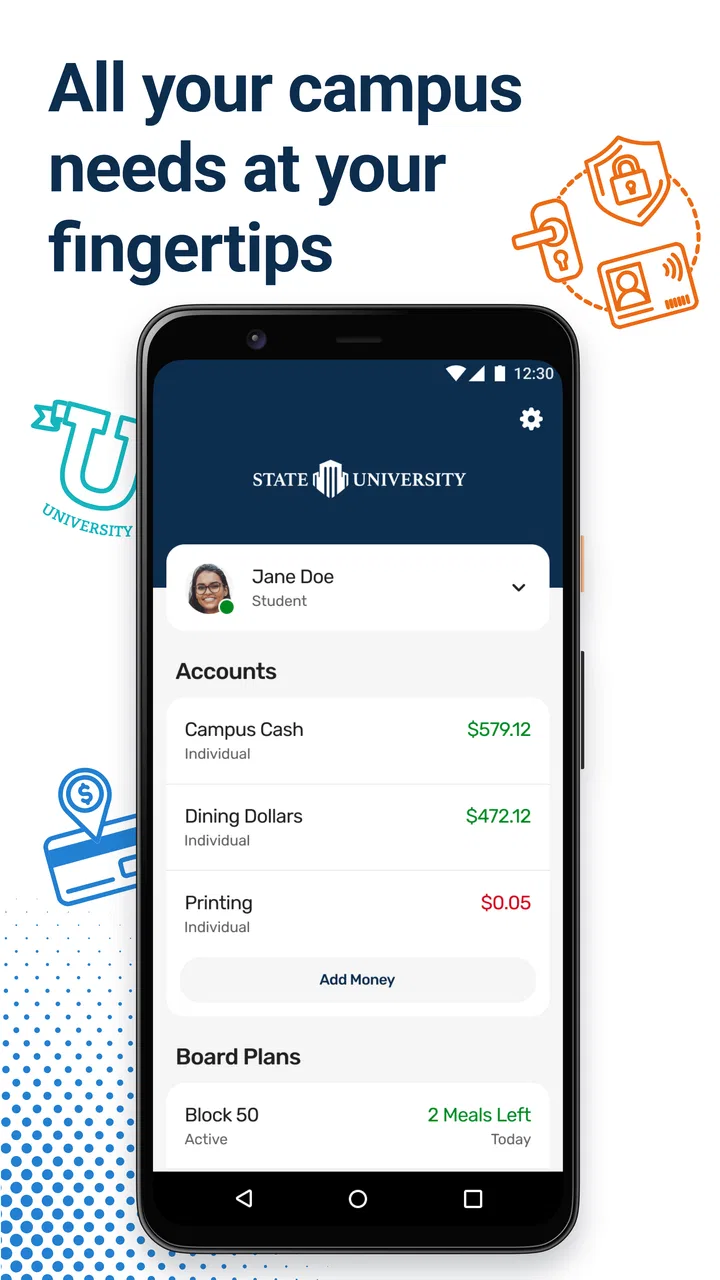
When the connection between the school and the app is already established, the workflow feels more natural than carrying a separate access card and checking a different place for campus funds. I particularly like the possibility of handling a quick payment without opening a banking app or manually entering card details at the moment of purchase. The advantage is not dramatic in one isolated interaction; it becomes noticeable after repeated daily use.
Access is the feature that changes the routine
For residents, dorm access is more than a decorative extra. A card can be left in a room, hidden under books, or forgotten after a rushed trip outside. Having access information on the phone gives the user another way to approach that problem. I would still avoid assuming that the phone should replace every backup method, especially before learning how the local system behaves, but the option can be reassuring.
A realistic example is a student returning from a late library session with a phone in hand and no easy access to a wallet. Instead of stopping to dig through a bag for a card, the student can use the campus access function if the residence supports it. The same person may then check an account or pay for a campus purchase without switching between several unrelated services. That is the kind of small, repeated convenience this app delivers well.
There is also a useful distinction between having a payment feature and having a full banking service. Transact eAccounts is designed around campus-related accounts and transactions, not around managing an entire personal financial life. I would not use it as my main budgeting tool, bank account, or universal wallet. It is better viewed as a bridge between a student’s campus identity and the services their institution has enabled.
Account management is helpful, but context matters
The account side can save time because it keeps campus-related information close to the access and payment functions. That makes sense for students who regularly need to think about balances, campus spending, or the practical status of their account. It is especially helpful when a user wants to check the campus side of their finances without opening a desktop portal.
Still, I would not expect the same level of detail found in a dedicated banking application. A campus account has a different purpose, and the information available will be shaped by the institution’s configuration. Users who need advanced personal finance tools, broad transaction categorization, or a complete view of outside accounts will be better served by a normal banking or budgeting app alongside this one.
One of my practical tips is to explore the account area before an urgent situation arises. Check where balances and payment-related options appear, and learn which parts are informational versus action-oriented. Doing that on a calm day is much better than trying to understand the interface while standing at a busy campus counter or outside a locked residence.
The strongest everyday advantage is consolidation
Many campus tools are useful individually but frustrating as a collection. One service may handle access, another may handle payments, and a web portal may hold account information. Transact eAccounts is appealing because it attempts to bring those related needs into one mobile experience. That consolidation is more valuable than any single button.
I also appreciate that the app is free. There is no purchase decision standing between a student and the basic download, which makes it easier to try when an institution recommends it. Its Everyone content rating also makes the app broadly suitable for campus communities, although suitability in practice still depends on whether a person’s school supports the relevant functions.
The app has reached over one hundred thousand installs and holds a 4.1 average from around three thousand ratings. Those figures suggest that it has found a real audience, but I would read them as a sign of practical adoption rather than proof that every campus experience is identical. A campus-access app can feel excellent in one institution and limited in another because the services behind it are not necessarily configured the same way.
Where the experience can become frustrating
The biggest weakness is dependence on the institution. With a note-taking app, most of the experience is controlled by the developer and the user’s device. With Transact eAccounts, the usefulness of access and payment functions is tied to the campus environment. If the school has not enabled a particular capability, the app cannot compensate by itself.
That dependency also affects expectations. A reader may install the app after seeing that it supports dorm access and assume the phone will immediately work as a key. I would not make that assumption. First confirm that the relevant residence or campus service uses the app, then complete the setup before the first moment when access is essential. Testing it in advance is one of the most important habits for avoiding an unpleasant surprise.
Another limitation is the risk of putting too much responsibility on one device. If the phone battery is empty, the device is damaged, or the user cannot reach the necessary screen quickly, the convenience can turn into friction. I recommend keeping whatever backup access method the institution provides until the app has become familiar and reliable in the user’s specific environment.
The app’s focus can also feel narrow for students expecting an all-in-one campus hub. It is not the place I would go for course materials, assignment reminders, timetable planning, messaging, or academic progress. Those needs belong to learning platforms and student portals. The narrow design is sensible, but it means the app will not reduce the total number of campus apps for everyone.
Payment convenience is not the same as universal payment support
The payment function is most useful when a student already has an eligible campus account or balance connected to the institution. It can simplify supported campus purchases, but I would not treat it as a replacement for every payment method in a student’s wallet. Restaurants, shops, transport systems, and online services outside the campus arrangement may still require a bank card or another wallet.
This is also where I would be careful with the phrase “no card needed.” It describes the intended convenience of supported campus use, not a promise that a physical card will never be useful. A student who leaves home without a backup payment option could be caught out if a location does not accept the campus account or if the phone cannot be used at that moment.
My second practical tip is to separate emergency planning from routine convenience. Use the app for regular supported transactions, but keep a modest backup plan for situations involving a dead battery, a lost phone, or an unsupported terminal. That is not a criticism of this particular app so much as a sensible trade-off whenever a phone becomes part of access and payment.
Version changes and setup deserve attention
The current version is 2026.3.1, identified by the build number 2026031801, and the app requires Android 10 or later. That requirement is reasonable for many current phones, but users with older devices should check compatibility before planning around it. I would also install updates rather than ignoring them, especially for an app connected with access and account functions.
Setup is the stage where patience pays off. I would install the app while connected to a dependable network, sign in with the institution’s expected credentials, and inspect each enabled function rather than assuming every feature is active. If access is important, I would test the process during normal hours and keep the institution’s support route available in case the account needs to be linked or corrected.
A less obvious point is that the app’s value depends on the phone being treated as part of the access routine. That means users should think about practical habits: keeping the device charged before leaving, knowing where the relevant function is, and avoiding last-minute setup outside a locked building. These are small details, but they determine whether a convenient digital credential feels dependable.
Who should use it and who should look elsewhere
I would recommend Transact eAccounts first to students living in supported campus housing, especially those who regularly use campus payment accounts or dislike carrying a separate access card. It is also a sensible choice for students who want one mobile place for several campus-related tasks and whose institution has clearly adopted the service.
Parents or guardians managing campus-related funds may also appreciate that the student has a dedicated place to interact with the relevant account, although the exact account roles and controls depend on the institution. I would not assume that every person connected with a student can view or manage the same information. The student should check the account arrangement rather than sharing login details casually.
Occasional visitors, commuters, and students who rarely use dorms may see less benefit. If campus access is not part of their routine and their school handles payments elsewhere, a normal mobile wallet or the institution’s main portal may be more useful. Likewise, students looking for academic organization should choose a learning-management or planning app instead of expecting this one to cover coursework.
Compared with carrying a physical campus card, the app offers less bulk and potentially faster access, but it introduces phone-related concerns. Compared with a general mobile wallet, it is more closely tied to campus services and may offer a better fit for institutional access, while being less broadly accepted in everyday shopping. Compared with a bank app, it is more relevant to campus balances and access, but far less suitable for managing wider personal finances.
That comparison helped me form a clear recommendation: do not ask whether this app is better than every alternative. Ask whether it matches the job you need done. If the job is supported campus entry and campus account use, it has a convincing reason to exist. If the job is general payments, academic planning, or financial management, another tool will probably be the better centerpiece.
Three habits that make the app more dependable
Set it up before move-in or the first important campus day. I would verify the account connection and try the access workflow in advance instead of waiting until a door or payment counter creates pressure.
Keep a backup while learning the local routine. A physical card or another approved method can protect against a dead phone, an unsupported location, or a sign-in problem. Once the app is familiar, the backup remains useful for emergencies.
Use it as a campus tool, not a complete financial system. Check campus-related balances and payments here, but keep banking, budgeting, and broader spending decisions in the services designed for those jobs.
These habits also answer the questions I think most new users will have. Is it free? Yes, the app is listed as free. Will it work for every student? Only when the student’s institution and relevant services support it. Can it replace a physical card everywhere? No; its advantage is limited to compatible campus situations. Does it replace a banking app or learning platform? No, because its role is much narrower.
My final assessment
After looking at the app as a daily campus tool, I see a clear thesis: Transact eAccounts is worthwhile when your institution has made it part of the access and payment infrastructure, but it is not valuable simply because it exists on your phone. Its success depends on the connection between the app, the campus account, and the doors or services you actually use.
The best part is the reduction of small points of friction. A student can keep campus access and account actions close at hand instead of relying exclusively on a card or a scattered set of portals. The free price and focused design make it easy to try, and the current release shows that the app remains actively maintained as a practical campus utility.
The meaningful drawback is equally clear: users need realistic expectations and a backup plan. Institution-specific support, phone reliability, and the limits of campus-only payments all matter. Someone who wants a universal wallet or a complete student dashboard may be disappointed, while someone who needs supported dorm access and campus account convenience may find it genuinely useful.
For that audience, I would recommend installing it, completing setup early, and testing the functions that matter most before depending on them. For everyone else, I would choose a general wallet, banking app, or academic platform according to the actual need. In the right campus environment, Transact eAccounts earns its place by making routine student life a little easier without pretending to solve problems outside its lane.
FAQs for Transact eAccounts
01What is Transact eAccounts and what does it offer?
Transact eAccounts is a mobile application designed for managing campus-related financial transactions. It allows students to access their account balances, view transaction history, and make payments for various services like dining and bookstore purchases. The app aims to streamline financial interactions for a seamless campus experience.
02Is Transact eAccounts secure to use for financial transactions?
Yes, Transact eAccounts employs advanced security measures to ensure user data and financial transactions are protected. It uses encryption and secure login protocols to safeguard personal information. However, users are encouraged to regularly update their passwords and monitor account activity for enhanced security.
03Can I access multiple accounts within the Transact eAccounts app?
Absolutely. Transact eAccounts allows users to manage multiple accounts within the app. This feature is particularly useful for students who may have separate accounts for dining, bookstore purchases, and other campus services. Users can easily switch between accounts to monitor balances and transactions.
04Does Transact eAccounts provide real-time updates on account activity?
Yes, the app offers real-time updates on all account activities. Users can view their current balances, recent transactions, and payment statuses instantly. This feature is designed to help students keep track of their spending and manage their finances effectively while on campus.
05Is Transact eAccounts compatible with both Android and iOS devices?
Transact eAccounts is fully compatible with both Android and iOS platforms. This ensures that students can access their accounts and manage transactions conveniently from their smartphones or tablets, regardless of the operating system they use. The app is available for download on both the Google Play Store and the Apple App Store.
Pros
- User-friendly interface for seamless navigation.
- Supports multiple payment methods.
- Real-time balance updates.
- Secure and reliable transactions.
- Customizable alerts for account activity.
Cons
- Limited customer support options.
- Occasional sync issues with accounts.
- Requires stable internet connection.
- Limited offline functionality.
- Some features behind paywall.

Transact eAccounts
Gallery